CineData ETL Azure
What this project is
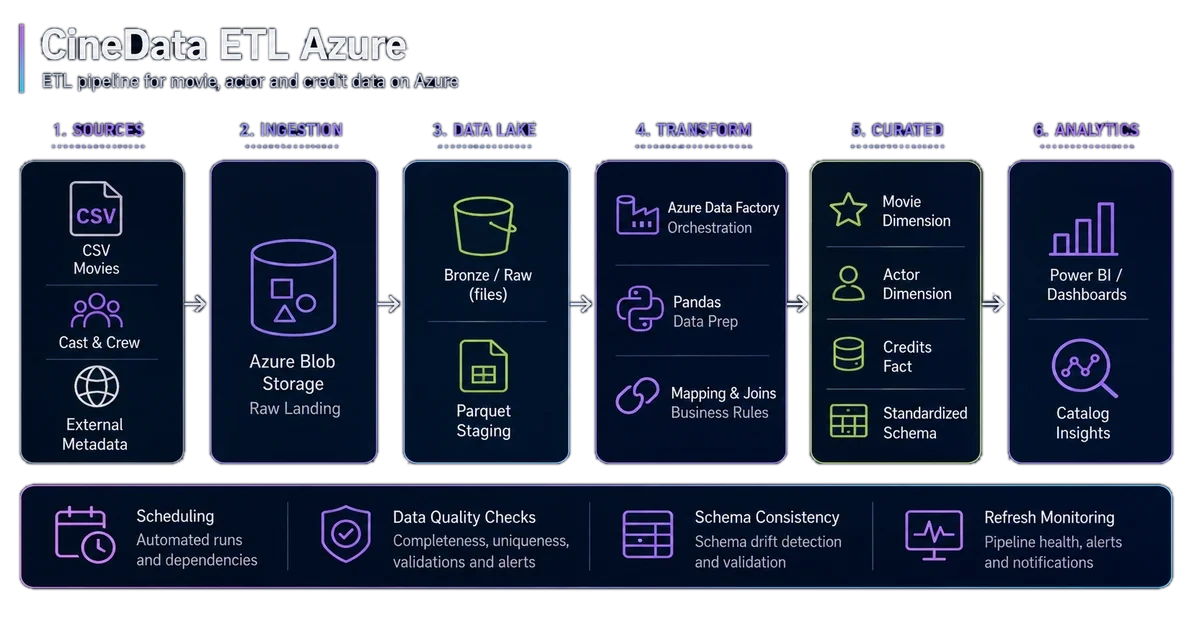
CineData ETL Azure is a parameterized ETL pipeline on Azure Data Factory that transforms a raw movie catalog into a filtered, enriched, analytics-ready Parquet dataset. The project demonstrates Blob Storage ingestion, Pandas preprocessing, and Mapping Data Flow with configurable parameters.
Technical context
A movie catalog containing 9,125 titles was available as a CSV file, but the raw format was not yet suitable for repeatable analytics. Columns needed to be checked, types standardized, and records filtered through criteria that could change without rewriting the transformation logic.
The challenge was not simply selecting highly rated films. The initial cleaning stage had to be separated from the cloud workflow, an efficient intermediate format had to be preserved, and the final output needed execution metadata for traceability.
Objective
The objective was to build a demonstrative Azure ETL pipeline covering the path from source file to analysis-ready output:
- explore and clean the CSV with Python and Pandas;
- convert the intermediate result to Parquet;
- separate input and output through dedicated Azure Blob Storage containers;
- make rating and year filters configurable;
- add processing metadata for traceability;
- produce a compact and consistent final dataset.
The pipeline turns a manual filtering task into a declarative, repeatable cloud process that can be adapted to different selection criteria.
Architecture
The workflow is organized into five steps:
moviesDB.csvprovides the source catalog with title, genre, year, and rating;- the
Analisi_Film.ipynbnotebook performs exploratory analysis, cleaning, and conversion toMoviesDB2_clean.parquet; - the clean file is uploaded to the Azure Blob Storage
inputcontainer; - the
CineData-ETLpipeline executes themovies_etl_dfMapping Data Flow; - the result is written to the
outputcontainer asMoviesDB2_processed.parquet.
The notebook handles initial data preparation, while Azure Data Factory contains the reusable filtering, enrichment, and output publishing logic.
Dataset and preprocessing
The source dataset contains five main fields: movie identifier, title, genres, release year, and rating. Pandas is used to inspect the structure, retain the required columns, and generate a Parquet file with a consistent schema.
This separation keeps exploratory notebook operations out of the Data Flow. Azure receives structured input on which it can apply configurable and repeatable transformations.
Parameterized Mapping Data Flow
The Data Flow exposes three parameters:
rating_threshold, defaulting to 7;year_min, defaulting to 1890;year_max, defaulting to 2024.
The transformation retains records whose rating is above the threshold and whose year falls within the selected range. Values can be changed at execution time without editing the pipeline definition for each selection.
Transformations and traceability
After filtering, the flow adds four contextual fields:
processing_timestampidentifies when processing occurred;pipeline_nameidentifies the process;source_filepreserves data lineage;data_versionassociates a temporal version with the output.
The final Select transformation also renames Title, genres, and Rating to film, genere, and valutazione. The output therefore uses a consumption-oriented schema and contains enough metadata to reconstruct the execution context.
Technical choices
Why separate Pandas and Azure Data Factory?
Pandas is well suited to exploration and initial cleaning, while Azure Data Factory makes the operational filtering step parameterized and repeatable. The separation keeps the notebook readable and prevents manual steps after the file reaches Azure.
Why use Parquet?
Parquet preserves schema, supports columnar reads, and reduces storage compared with an equivalent CSV. The sink also uses Snappy compression to balance file size and processing speed.
Why use two Blob containers?
The input and output containers make the state of the data before and after transformation explicit. This reduces the risk of overwriting the source and simplifies output inspection.
Results
- 9,125 films in the source catalog;
- 2,726 films in the output, rated 8-10 and released between 1890 and 2024;
- 3 parameters allow the Data Flow to be reused with different criteria;
- 7 columns form the final schema, including 4 traceability fields;
- input and output are stored as Snappy-compressed Parquet.
The result is an analytics-ready dataset and an Azure pipeline that can be imported through versioned JSON definitions stored in the repository.
Future evolution
The most natural next steps focus on industrializing the pipeline and connecting the curated dataset to downstream analytics tools.
- move preprocessing into a fully orchestrated Azure workflow;
- extend data quality rules for nulls, duplicates, and expected domains;
- strengthen resilience and observability with retries, alerts, and execution logs;
- activate scheduled or event-driven triggers for recurring runs;
- centralize linked services and secrets with Azure Key Vault;
- automate checks on output counts, schema, and file format;
- publish the final dataset to a SQL engine or BI dashboard.
Technical FAQ
Is the filter fixed?
No. Minimum rating, start year, and end year are Mapping Data Flow parameters and can be overridden for every execution.
Why does the default value 7 produce ratings from 8 to 10?
The condition is Rating > rating_threshold. A threshold of 7 therefore retains ratings strictly above 7.
Does the pipeline execute the Pandas notebook?
No. In the current project, the notebook runs separately and produces the Parquet file uploaded to the input container. Automating this step is one of the planned improvements.
Which assets are versioned in the repository?
The repository includes the notebook, sample datasets, JSON definitions for the ADF pipeline, Data Flow and datasets, project documentation, and an Azure cost estimate.